Vault
Self-custodial execution wallet for AI agents on Robinhood Chain and Base. Authorize x402 payments, trade ERC-20s and RWAs, and supply to Morpho lending vaults without exposing private keys.
Get Vault
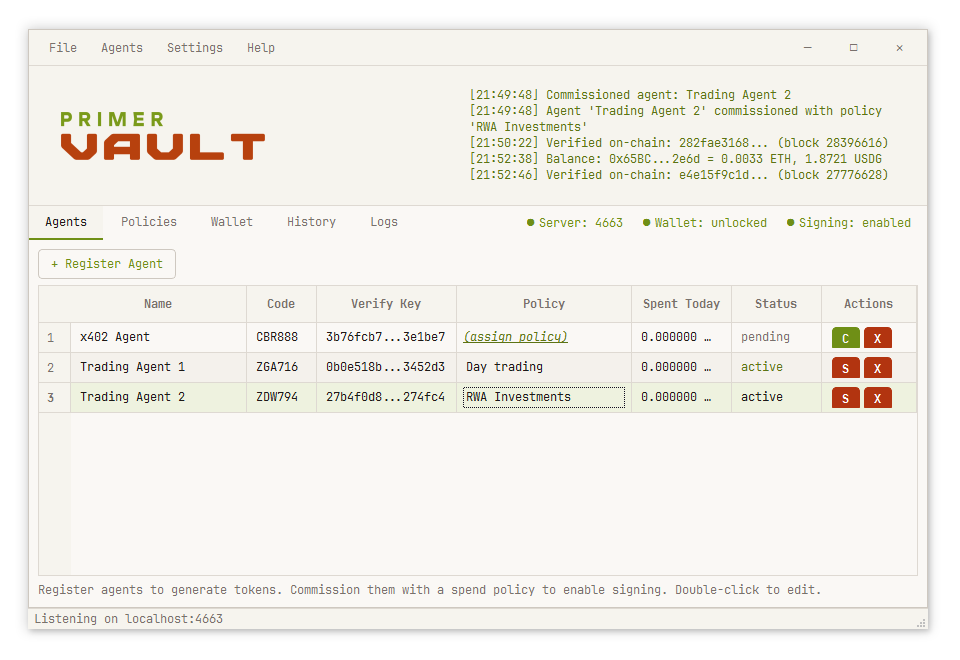
Vault Desktop — a window. Download Vault.exe from GitHub Releases and run it; nothing to install.
Vault Terminal — one command, in any terminal, on any machine, with or without a screen:
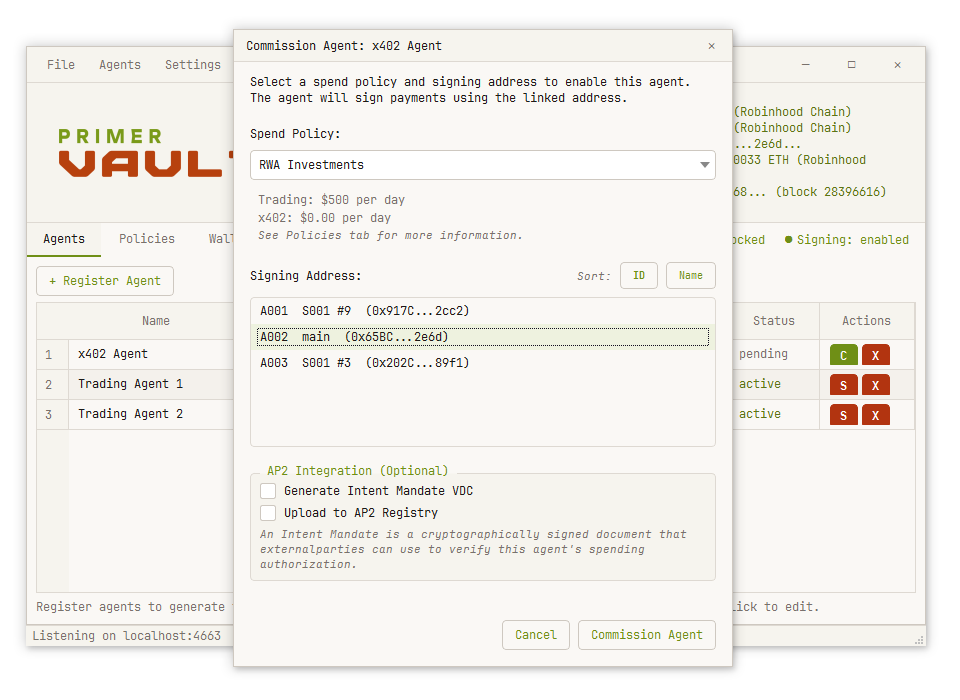
pip install primer-vaultBoth editions run the same engine, keys, policies and agent API — see Installation below for details, or jump to Getting Started.
What is Vault?
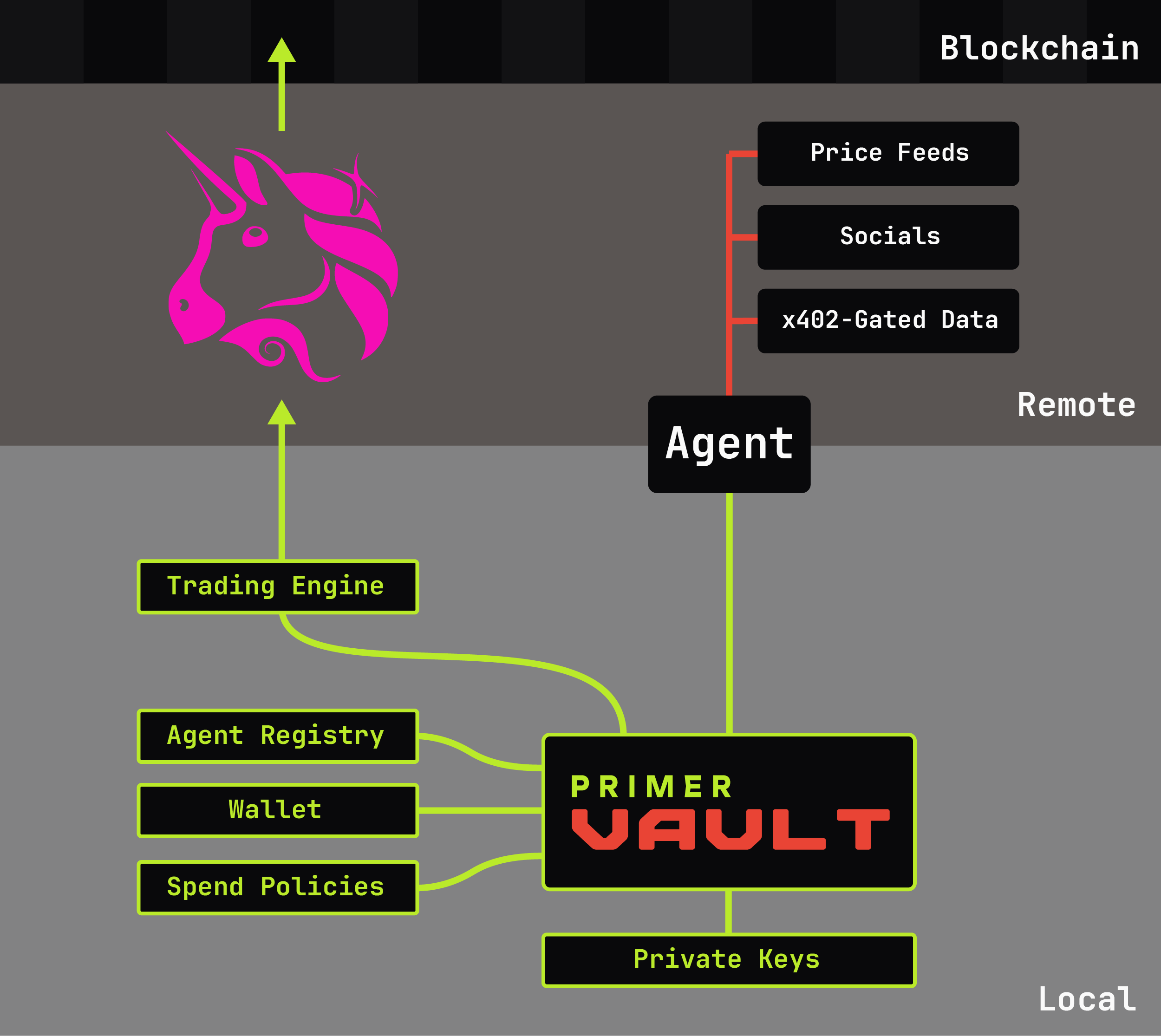
Vault manages on-chain authorization for AI agents. When your agents need to pay for x402 services, execute token swaps on Uniswap, or supply to a Morpho lending vault, they request authorization from Vault. Vault enforces your spend policy and either signs automatically or asks you first — your keys never leave the device.
It ships as two editions over one shared engine, so the authorization model is identical either way:
- Vault Desktop — a window. You approve requests in a dialog, and only the window itself can drive it: there is no way in from outside the process.
- Vault Terminal —
pip install primer-vault, for a headless machine or a server. Requests that need a human queue and appear in the live feed rather than a dialog.
Three authorization lanes, available in both editions:
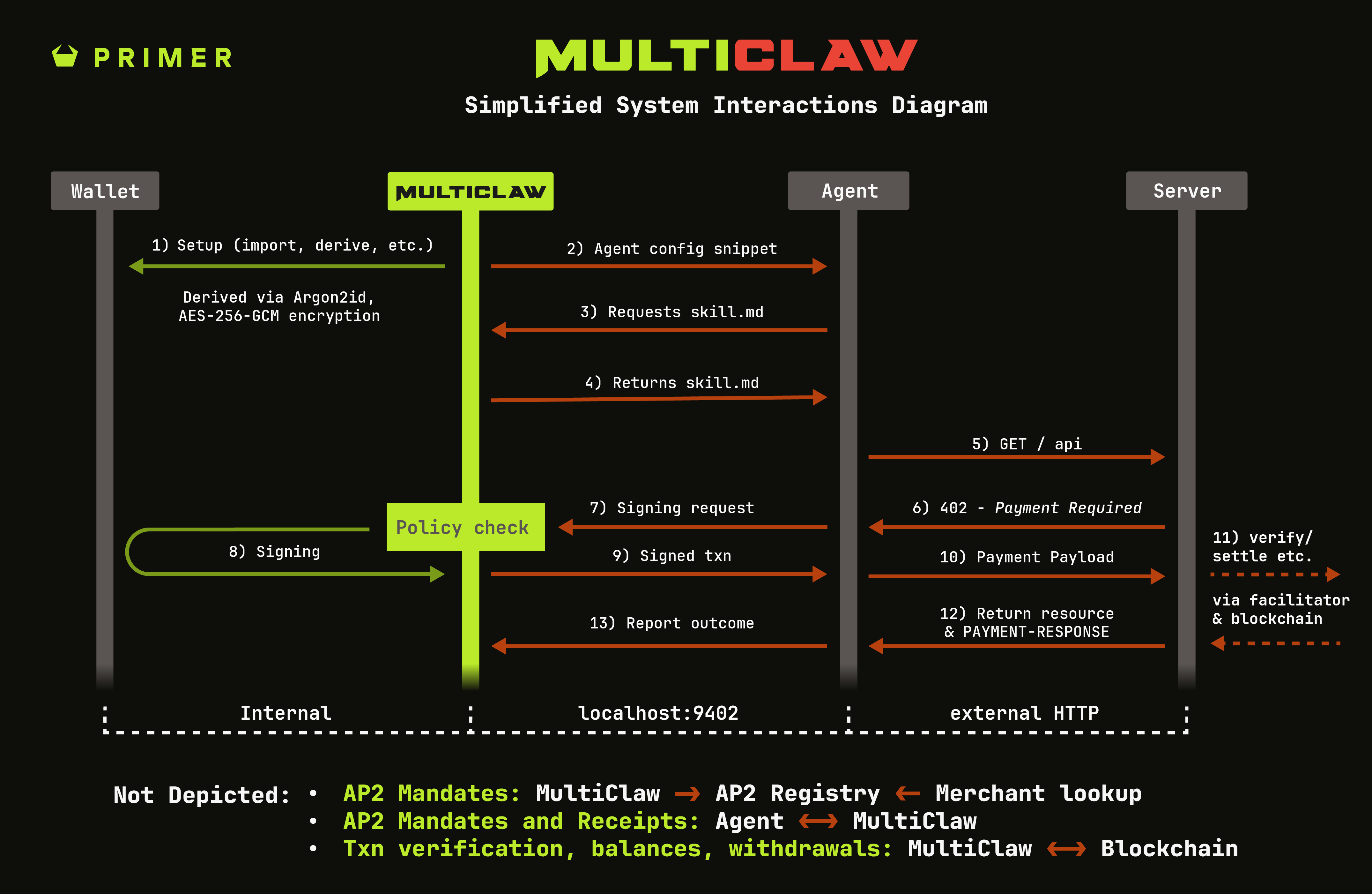
- x402 Payments — agents request signatures for paywalled APIs; Vault enforces spending policies and signs EIP-712 TransferWithAuthorization messages. Contains the full MultiClaw engine for x402 v1/v2 protocol support.
- DeFi Trading — agents submit swap requests for ERC-20 tokens and RWAs; Vault re-quotes independently via Uniswap v3/v4, enforces trading limits, and executes on-chain.
- Morpho Lending — agents supply USDG to a Morpho vault and withdraw it again; Vault resolves venues live from the chain, enforces an exposure cap read from your on-chain position, and simulates every write before it is offered for approval.
All three lanes share the same agent identity, policy system, and approval workflow. The agent never sees private keys.
Key Features
| Feature | Description |
|---|---|
| x402 v1/v2 Support | HTTP 402 payments with EIP-3009 TransferWithAuthorization signing |
| Uniswap v3 & v4 Trading | Execute token swaps with independent re-quoting and slippage protection |
| Morpho Lending | Supply and withdraw USDG against a live-resolved, curator-restricted venue set, with exposure read fresh from chain |
| Key Isolation | Agents receive tokens with spending limits, never private keys |
| Spend Policies | Daily caps, per-request limits, auto-approve thresholds, domain restrictions |
| Trading Limits | Daily trading volume caps, per-trade maximums, slippage ceilings, minimum ETH gas reserve |
| Multi-Agent Support | Register unlimited agents, each with their own policy and wallet assignment |
| Bearer & HMAC Auth | Simple token-based auth or cryptographic HMAC-SHA256 signatures |
| AP2 Intent Mandates | Generate signed credentials for merchant/protocol verification |
| Blockscout Integration | Auto-discover all token balances via Blockscout API |
Supported Networks
Vault runs on Robinhood Chain (chain ID 4663), an L2 with native USDG (Global Dollar) stablecoin and RWA (Real World Asset) token support, and Base (chain ID 8453).
| Network | Chain ID | CAIP-2 | Reference Stablecoin |
|---|---|---|---|
| Robinhood Chain | 4663 | eip155:4663 |
USDG 0x5fc5360D0400a0Fd4f2af552ADD042D716F1d168 |
| Base | 8453 | eip155:8453 |
USDC 0x833589fCD6eDb6E08f4c7C32D4f71b54bdA02913 |
x402 payments price a chain's reference stablecoin 1:1; any other asset the resource server accepts gets a bounded on-chain quote. Trading and Morpho lending support any asset with liquidity/curated venues on either chain.
Interfaces
Vault Desktop and Vault Terminal are two separate editions built from the same engine, not two modes of one program. Each is a complete way to interact:
| Edition | Launch | Use Case |
|---|---|---|
| Vault Desktop | Vault.exe, or File → Console inside it for a terminal panel |
A window with approval dialogs. Nothing outside the process can drive it — there is no control channel into the desktop edition at all. |
| Vault Terminal | primer-vault (opens a session), or primer-vault <command> for a single command |
A prompt with a live event feed, for a headless machine or a server. A request needing a human queues and appears in the feed rather than a dialog. |
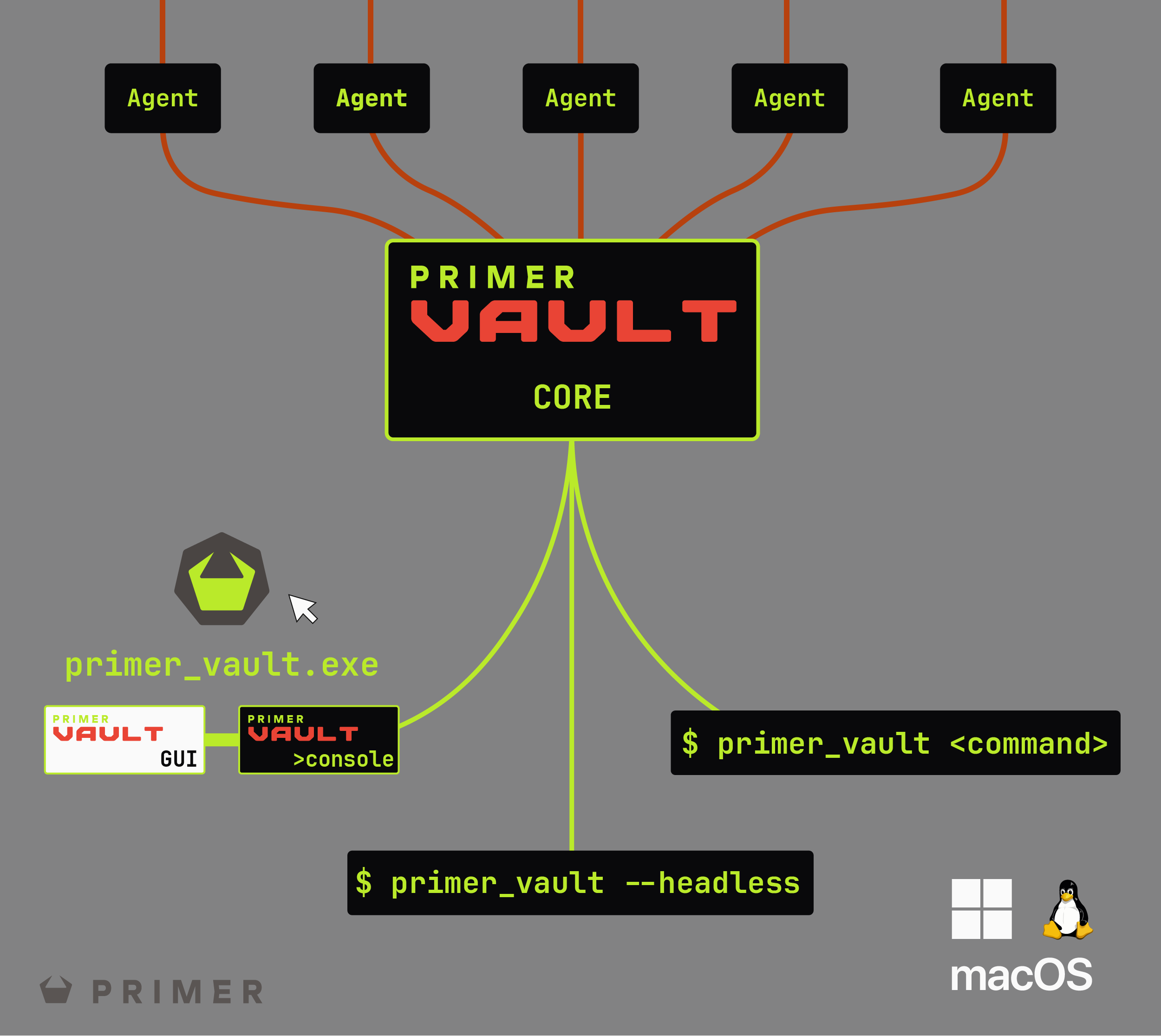
No mode flags in the terminal edition: primer-vault behaves identically wherever it runs, and decides whether this process becomes the engine or attaches to one already running by checking the instance lock on the data directory. Closing your terminal never stops an engine you did not start. Desktop's Console panel and the terminal edition share the same command set — see Commands Reference for details.
Installation
Vault Desktop
Download the latest Vault.exe from GitHub Releases and double-click to launch. No installation required — can be run locally or from USB.
Vault Terminal
pip install primer-vaultThen run primer-vault from any terminal. This is a lean install with no graphics toolkit pulled in, so it installs cleanly on a machine with no screen.
To run Vault Terminal at boot on a server, use primer-vault install-service, which registers it with systemd on Linux or Task Scheduler on Windows.
Getting Started
Most users will find Vault Desktop the easiest way to get started. The same steps work identically in Vault Terminal.
1. Create a Wallet
On first launch, create a new wallet or import an existing seed phrase. The wallet is encrypted with AES-256-GCM using Argon2id key derivation.
wallet create mywallet
seed create
address create S001 0 "Agent Funding"
2. Fund Your Wallet
Send ETH (for gas) and USDG to your wallet address. The app shows your balance via Blockscout API with auto-discovery of all tokens including RWAs.
3. Create a Spend Policy
Define spending rules for x402 payments:
policy create standard --day 100 --txn 10 --auto 1- Daily limit (
--day) — maximum total spending per day (USDG) - Per-request max (
--txn) — maximum single payment amount - Auto-approve threshold (
--auto) — payments below this are signed automatically - Domain restrictions — allowlist or blocklist specific domains
To enable trading, add trading options:
policy create trader --day 100 --txn 10 --auto 1 \
--trading --trade-daily 500 --trade-max 100 --trade-auto 25- Enable trading (
--trading) — allow this policy to execute swaps - Daily volume (
--trade-daily) — max notional USD per day (default: 500) - Per-trade max (
--trade-max) — single trade size limit (default: 100) - Trade auto-approve (
--trade-auto) — auto-execute trades below this
To enable Morpho lending, add lending options:
policy create lender --day 100 --txn 10 --auto 1 \
--morpho --morpho-max 50 --morpho-total 250- Enable lending (
--morpho) — allow this policy to supply and withdraw - Max per deposit (
--morpho-max) — single deposit size limit (default: 100) - Max total deployed (
--morpho-total) — exposure ceiling across every venue at once (default: 500) - Restrict to Steakhouse — on by default; pass
--no-restrictto permit any Morpho venue
4. Register an Agent
agent register "My Claude Agent" --auth hmac- HMAC (recommended) — agent signs requests with a shared secret
- Bearer — agent sends a static token (simpler, less secure)
Copy the agent credentials to your AI agent's environment. Lost the credentials? Use agent instructions <name> or click "View Instructions" in the agent properties dialog.
5. Commission the Agent
Assign a wallet and spend policy to the agent:
agent commission ABC123 standard A0016. Start the Server
server start

# Desktop: click "Start Server" in the Network tab instead
The agent server listens on localhost:9402 by default.
Note: The agent server needs a long-running process behind it. In Vault Desktop, that is the application window — it serves agents while open. In Vault Terminal, run server start inside a session (primer-vault with no arguments) rather than as a one-shot command, or use primer-vault install-service to keep it running at boot. A bare one-shot primer-vault server start exits immediately after starting the server, taking the engine down with it unless another Vault Terminal process is already holding the data directory.
Agent Integration
Agents communicate with Vault via HTTP on localhost:9402.
The wallet must stay unlocked for agents to be answered at all — not just for signing, but for every authenticated endpoint including /mandate and /balances. Vault is locked by default on startup, so an agent commissioned right after wallet create works immediately, but the same agent gets rejected after the wallet is closed or the app is restarted without re-unlocking. HMAC agents (the default) see a plain AUTH_FAILED in this case rather than a message naming the wallet, by design — see Errors for why. If an agent that was working suddenly fails every request, check that the wallet is still unlocked before looking anywhere else.
x402 Payment Flow
- Agent receives HTTP 402 with
Payment-Requiredheader - Agent forwards the header to
POST /sign - Vault validates against policy, signs if allowed
- Agent receives signed payment header
- Agent retries original request with
PAYMENT-SIGNATUREheader - After settlement, the agent may report the result to
POST /callback, which records it on the transaction and its receipt
Trading Flow
- Agent posts trade request to
POST /trade - Vault re-quotes via Uniswap Quoter contract
- Vault validates against trading policy
- Trade executes on-chain (or escalates for approval)
- Agent receives tx_hash and execution result
When Daily Limits Reset
Daily spending and trading allowances renew at midnight, local time on the machine running Vault — your day, not UTC. Timestamps on receipts and transaction records stay in UTC, so the audit trail remains comparable to the chain and to other systems.
An allowance also has to have lasted at least 20 hours before it renews. That closes the gap either way round the clock: a machine whose date moves backwards — a clock correction, or a laptop carried west — cannot claim a second allowance the same day, and one carried east cannot cross midnight after a few hours and claim one early. A real local day is 23 to 25 hours, so a legitimate one always qualifies.
Trades Awaiting Approval
A trade that needs your approval is held for 15 minutes. If it
has not been approved by then it is automatically rejected, and the agent sees
status: "rejected" with an expiry reason. To go ahead after that, the
agent submits the trade again.
The reason is the price. A quote reflects the pool at the moment it was taken, and an approval given against a price from hours earlier is not the trade anyone looked at. Rather than execute on stale terms, Vault lets it lapse.
When you do approve inside the window, Vault does not reuse the original quote:
- the pool is quoted again, at the price now;
- the trading policy is applied to that fresh value, so a limit you tightened or an agent you suspended in the meantime takes effect;
- the fresh price must still clear the minimum output the original request
committed to. That minimum comes from the
max_slippage_bpsthe agent asked for, so the agent's own tolerance covers the whole wait, not just the instant of execution.
If the price has moved further than that tolerance allows, the trade is rejected
with code: "PRICE_MOVED" rather than filled at a worse rate. The same
minimum is enforced on-chain by the swap itself, so it holds even if something
were to slip past Vault.
Trades waiting for approval count against the daily volume limit while they wait. Queuing several does not let their combined value exceed the cap; the allowance is returned if a trade is rejected, expires, or fails.
A Morpho supply or withdraw above the auto-approve threshold waits the same
way, and is re-quoted and re-checked against policy the same way when you approve
it. While a request is being approved — the re-quote, the policy check, and
up to two on-chain confirmations if it needs a prior ERC-20 approval — polling
its status endpoint returns status: "executing" rather than a not-found
error, so an agent watching the id does not conclude the request has vanished.
Example: Payment Request (Bearer Mode)
POST http://localhost:9402/sign
Content-Type: application/json

{
  "agent_id": "ABC123",
  "signature": "AT_your_token_here",
  "payment_required": "eyJhY2NlcHRzIjpbey4uLn1d",
  "request_url": "https://api.example.com/resource"
}
Example: Trade Request
POST http://localhost:9402/trade
Content-Type: application/json

{
  "agent_id": "ABC123",
  "signature": "AT_your_token_here",
  "trade": {
    "token_in": "0x5fc5360D0400a0Fd4f2af552ADD042D716F1d168",
    "token_out": "0x0Bd7D308f8E1639FAb988df18A8011f41EAcAD73",
    "amount_in": "100.0",
    "fee_tier": 3000,
    "max_slippage_bps": 50
  }
}
Manual Approval
When a payment or trade exceeds the auto-approve threshold, Vault returns status: pending with a request_id. A dialog appears for you to approve or deny. The agent polls the status endpoint until resolved.
API Endpoints
Agent server runs on port 9402 (configurable).
Agent Endpoints (port 9402)
| Endpoint | Method | Purpose |
|---|---|---|
/health |
GET | Check if Vault is running |
/status |
GET | Agent status and limits (authenticated) |
/agent |
GET | Agent setup instructions (SKILL.txt) |
/agent/1claw |
GET | 1Claw skill — secrets, multi-chain signing, approvals (separate wallet, see Partner Integrations) |
/sign |
POST | Request x402 payment authorization |
/sign/status/{id} |
GET | Poll for manual approval result |
/sign/helper |
GET | Download Python signing helper script |
/trade |
POST | Submit a swap request |
/trade/status/{id} |
GET | Poll for trade result |
/venues |
POST | List Morpho venues this agent's policy permits, and what it already holds in each |
/position |
POST | Submit a Morpho supply or withdraw request |
/position/status/{id} |
GET | Poll for a lending result |
/mandate |
POST | Get agent's wallet address, policy limits and Intent Mandate |
/balances |
POST | Get agent's wallet address and on-chain balances (native + tokens) |
/callback |
POST | Report transaction settlement |
/ping |
POST | Check an agent is known and able to work. Unsigned, so it
reports only the agent's name and status — use
/mandate for the policy behind it |
Trading
Vault executes trades via Uniswap v3 and v4 on Robinhood Chain and Base.
Supported Operations
- Token → Token swaps via Uniswap pools
- Native ETH swaps — use
"ETH"oraddress(0)astoken_inortoken_out; the router auto-wraps on the way in and unwraps atomically on the way out - ETH → WETH wrapping (no pool needed)
- WETH → ETH unwrapping (no pool needed)
Uniswap v3 Fee Tiers
| Fee Tier | Basis Points | Typical Use |
|---|---|---|
| 100 | 0.01% | Stablecoin pairs |
| 500 | 0.05% | Stable/correlated assets |
| 3000 | 0.30% | Most pairs (default) |
| 10000 | 1.00% | Exotic/volatile pairs |
V4 Differences
Uniswap v4 uses a singleton PoolManager architecture. V4 trades require additional fields:
tick_spacing— pool tick spacing (required)hooks— hooks contract address (use zero address for no hooks)
Version is inferred from field presence or can be explicitly set via dex_version: "v4".
Note: the UniversalRouter's ExactInputSingleParams carries a minHopPriceX36 field (standard current Uniswap v4-periphery behavior, on both chains) that hand-built calldata often omits. Use Vault for all trades rather than assembling the call yourself.
Spend Policies
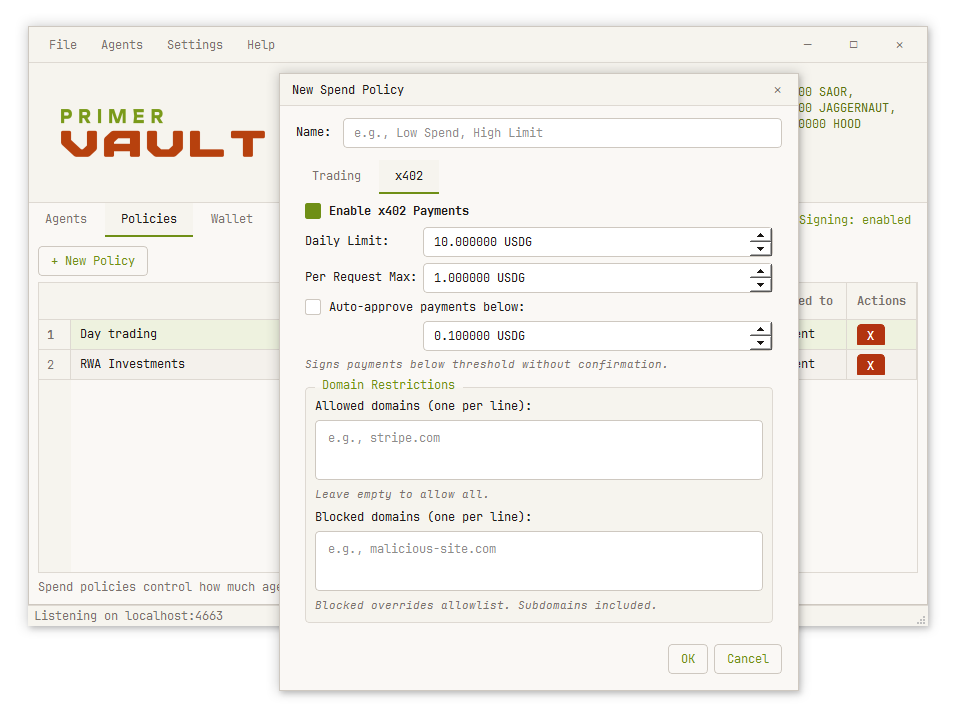
Policies define what an agent can spend and trade. Each agent is assigned exactly one policy.
x402 Payment Limits
- Daily limit — maximum spending per day, where a day ends at local midnight and has to have lasted at least 20 hours (see When Daily Limits Reset). Agent status changes to "limit_reached" when exhausted.
- Per-request max — requests exceeding this are rejected outright.
- Auto-approve threshold — payments below this are signed without prompting. Set to 0 for manual-only.
- Allowed domains — if set, only these domains can receive payments (includes subdomains)
- Blocked domains — these domains are always rejected (includes subdomains)
What a policy can and cannot enforce
The domain allowlist and blocklist are checked against the domain the agent itself supplies in its request. They keep an honest agent inside the boundaries you set — they are not a defence against a compromised or malicious agent, which can name whatever domain it likes. The real backstops are the amount limits and, above the auto-approve threshold, your own approval.
Below the auto-approve threshold the amount is the only constraint: a payment under it is signed without prompting, whatever the domain. Set the threshold to 0 to review every payment, and keep it low for anything you do not fully trust.
Trading Limits
- Daily trading volume — maximum notional USD value of trades per day
- Per-trade max — single trade size limit
- Auto-approve threshold — trades below this are approved without prompting. Set to 0 for manual-only.
- Minimum ETH balance — trading stops while your ETH balance is below this level
- Maximum slippage — how far the final on-chain fill may drift from the price Vault quoted. Enforced by the chain through a minimum-output amount.
- Maximum price impact — how much worse than the pool's own rate a fill may be, fee included. Above it, Vault asks you rather than executing.
Price impact — checking the pool the agent chose
An agent names the pool it wants to trade through, including its fee tier. That is the one decision Vault cannot verify by re-quoting, because re-quoting the same pool only confirms the agent's own arithmetic. A pool with almost no liquidity will quote a fill worth a fraction of what goes in, stay well inside its slippage tolerance, and report exactly the trade size the agent asked for.
So Vault measures the rate as well as the size. Before every trade it quotes a dust amount through the same pool — small enough not to move the price — to learn what that pool's rate really is. It compares the actual fill against that rate and adds the tier's fee:
dust quote   ->  the rate with no meaningful impact
real quote   ->  the rate you would actually get
difference   +  the pool's fee  =  price impact
A pool with room for the trade costs its fee and nothing more — 0.05% in a 0.05% pool. A pool too thin for the trade reads far higher; the case this was built for measured 99.4%.
Only you can set this. An agent cannot propose or raise it, because it is the ceiling on a choice the agent itself is making.
This is not slippage. Slippage compares Vault's quote against the final fill and protects against the price moving while you wait. Price impact asks whether the price was any good to begin with.
Authentication Modes
HMAC Mode (Recommended)
Agent signs each request with HMAC-SHA256 using a shared secret. The signature includes a timestamp for replay protection (5-minute window by default).
signature: "SIG:1707823845:abc123def456..."More secure — the shared secret is never transmitted. The JSON that gets signed is different per endpoint — it is not simply {agent_id, timestamp} plus whatever you posted:
| Endpoint | Message to sign (before JSON.stringify with sorted keys, no whitespace) |
|---|---|
/sign | {agent_id, timestamp, payment_required} (or x402_data for the AP2 form); request_url is included too when the request sends one |
/trade | {agent_id, timestamp, trade} — trade is the same object you post in the request body |
/mandate | {action: "agent_read", agent_id, timestamp} |
/balances | Same as /mandate, including the literal action: "agent_read" — both are read-only, no-side-effect requests for an agent's own information, and share one auth check with one generic action tag rather than a name specific to either endpoint |
Example for /balances or /mandate:
message = JSON.stringify({
  action: "agent_read",
  agent_id: "ABC123",
  timestamp: 1707823845
})
// sort keys alphabetically, no spaces: {"action":"agent_read","agent_id":"ABC123","timestamp":1707823845}

signature_hex = HMAC_SHA256(shared_secret, message)
signature_header = `SIG:1707823845:${signature_hex}`
A signature built against a different message shape verifies as invalid and returns AUTH_FAILED — the same code a locked wallet can also produce for HMAC agents (see Errors), so a persistent AUTH_FAILED from a new integration is usually the message shape, not the wallet.
Bearer Mode
Agent sends a static token with each request.
signature: "AT_abc123def456..."Simpler for agents that can't do cryptographic signing. Use idempotency_key to make multiple payments to the same endpoint.
Hardware Wallets (Ledger)
An agent's wallet address can be backed by a Ledger device instead of an encrypted seed. The private key never leaves the device: Vault builds the transaction, the Ledger signs it, and you confirm on the device's own screen. Add one with + Add Address → Connect Ledger.
Four derivation-path layouts are supported, so an address you already use elsewhere can be reproduced exactly:
| Type | Path |
|---|---|
| Ledger Live | m/44'/60'/x'/0/0 |
| BIP44 Standard | m/44'/60'/0'/0/x |
| Legacy (MEW/MyCrypto) | m/44'/60'/0'/x |
| Custom | any path you enter |
- Blind signing must be enabled in the Ledger Ethereum app — Vault signs EIP-712 (x402) and contract calls (trades) the device shows as hashes.
- A DEX trade takes two confirmations: the ERC-20 approval, then the swap.
- Verify on Ledger re-derives a stored address on the device so you can confirm it matches before funding it.
- Both editions can sign with a Ledger — Vault Desktop prompts in a dialog, Vault Terminal prints the same prompts to the session. A Ledger still needs a physical button press either way, so a hardware-backed address cannot sign unattended in either edition. Auto-approve is only ever a policy decision — the device itself always requires a physical confirmation.
Enrolling a Ledger address — deriving it from the device for the first
time — also works in both editions: Desktop's + Add Address →
Connect Ledger dialog, or Terminal's address ledger list /
address ledger add <index> / address ledger verify.
Both derive through the same code, so the same index means the same address either
way.
Security
Wallet Encryption
Wallets are encrypted with AES-256-GCM. Key derivation uses Argon2id (256MB memory, 3 iterations, 4 threads), which costs roughly 280 ms per guess on a normal desktop — that figure is what makes a long passphrase worth choosing. Each wallet has a unique salt and IV, and the parameters are stored alongside them, so they can be raised later without stranding an existing wallet.
Agent Secrets
HMAC shared secrets are encrypted with your wallet password and can be retrieved later via agent instructions. Bearer tokens are stored as SHA-256 hashes — if lost, use --regenerate to create a new token.
Key Isolation
Agents never receive private keys. They receive a code and token that authorize them to request signatures. All signing happens locally in Vault.
Single Instance
Only one Vault instance runs per data directory — a second holds the keys and the daily-spend record in memory, and two would silently overwrite each other's. A second launch of Vault Terminal attaches to the running engine over the local control channel (see below) instead of starting a rival. Vault Desktop has no such attach path: a second Vault.exe against the same data directory simply refuses to start.
The Local Control Channel
Exists only in Vault Terminal. It is what lets a second primer-vault attach to an engine already running — from a second terminal, or from one started unattended at boot by install-service. There is no equivalent in Vault Desktop; nothing outside its own window can drive it.
Loopback only, and scoped to the data directory: an owner-only token file (written 0600 from the moment it is created) sits beside the engine's other data, and a connection must present it. No open port with no authentication of its own — a caller either has the token, because they can read the data directory, or the connection is refused.
Rate Limiting
The agent server limits requests to 300/minute per IP (configurable).
Intent Mandates (AP2)
An Intent Mandate is a signed credential documenting your authorization of an agent's x402 spending. You can:
- Generate when commissioning an agent
- Publish to the AP2 Registry for merchant verification
- Share the mandate ID with merchants who want to verify authorization
The mandate includes:
- Agent ID and a fingerprint of its auth key
- Spending limits (daily, per-request, auto-approve)
- Allowed networks
- Wallet address
- Your cryptographic signature
Privacy-sensitive fields — agent name, agent code, policy name and domain restrictions — are intentionally omitted. A mandate is published for merchants to verify, so it carries what proves the authorization and nothing that describes how you are organised.
Data Storage
Where Vault keeps your wallet depends on the edition. Vault Desktop is portable;
Vault Terminal (pip install) follows platform convention.
Vault Desktop — portable
Nothing is installed, so nothing is left behind on the machine. Vault stores
everything in a data folder next to the executable:
E:\                        <- a USB stick, or any folder you like
├── Vault.exe
└── data\
    ├── wallets\           # Encrypted wallet files
    ├── agents.json        # Agent registry
    ├── policies.json      # Spend/trading policies
    ├── transactions.json  # Payment, trade & lending history
    ├── settings.json      # Configuration
    ├── wallet_path.txt    # Last unlocked wallet
    ├── gui_settings.json  # Window state and preferences
    ├── vault.lock         # Single-instance lock
    ├── control.json       # Terminal edition only - local control channel token
    └── logs\              # Application logs

wallets\
├── main.wallet           # Your encrypted wallet
└── main.wallet.previous  # Previous save — a full second copy of your keys
*.wallet.previous is a fully-encrypted second copy of your
wallet, kept from the last save so a corrupted file can be recovered. It is
dropped when you change your password (so a leaked old password cannot open a leftover
copy) and deleted when you delete the wallet. Treat it with the same care as the wallet
itself.
The path is worked out each time Vault starts, from wherever the executable is
sitting — so a stick that mounts as E: on one machine and
F: on another works either way. Move the executable and your wallet
moves with it.
Three things to know. Your keys live beside the app, so if you run Vault straight out of your Downloads folder, that is where your wallet is — put it somewhere you will not clear out. Keep a backup of your seed phrase regardless: a lost or damaged USB stick is a lost wallet. And on a shared PC, put the data folder inside your own user profile rather than at a drive root or on a FAT32/exFAT stick, where another account could read it — the wallet stays encrypted either way, but the profile keeps other users out entirely.
Vault Terminal — platform-standard
You ran an installer, so Vault uses the location your OS expects:
| Platform | Location |
|---|---|
| Windows | %LOCALAPPDATA%\Primer\Vault |
| macOS | ~/Library/Application Support/Primer/Vault |
| Linux | ~/.local/share/Primer/Vault |
Same contents in both cases. If Vault cannot write to its data folder — an
executable in Program Files, a write-protected stick, a locked-down work
machine — it will not start silently. It tells you which folder it tried and what
to do about it.
Network Calls
Vault has no telemetry, no analytics and no crash reporting. It never sends your keys, your seed phrase or your password anywhere — signing happens on your machine.
It does need the network for the things a wallet cannot do offline. Everything it contacts is listed here.
| Host | When | What it learns |
|---|---|---|
rpc.mainnet.chain.robinhood.com / mainnet.base.org |
Quotes, balances, allowances, and broadcasting transactions | Your addresses, and the transactions you send |
api.blockscout.com (RHC) / base.blockscout.com (Base) |
Refreshing balances and discovering tokens | Your wallet address |
api.coingecko.com |
Valuing ETH-denominated trades against your policy limits | Nothing identifying — one price lookup, cached for a minute |
ap2.primer.systems |
Only when you upload an Intent Mandate | The mandate: agent ID, wallet address, spending limits |
Token icons are fetched from whatever URL Blockscout supplies for a token, so that
host varies — commonly assets.coingecko.com. Only image data is read.
The RPC endpoint is yours to change, per network. Point it at your own node under Settings → Network… and the first row above goes with it for that chain. The Blockscout and CoinGecko calls are what light up the balances and trade valuations; both fail gracefully, and a failed price lookup escalates a trade to manual approval rather than valuing it with a stale number.
Vault also listens on two loopback channels: 9402 for agents, and,
in Vault Terminal only, an ephemeral port for the local control channel described under
Security above. The agent API is bound to loopback unless you pass --allow-lan,
which exposes only that port to your local network. Neither accepts a request a web page
initiated.
Environment Variables
Agents receive these credentials at registration:
PRIMER_VAULT_AGENT_ID=ABC123
PRIMER_VAULT_AGENT_TOKEN=AT_...
PRIMER_VAULT_AUTH_MODE=hmac
PRIMER_VAULT_URL=http://localhost:9402
Partner Integrations
Vault partners with 1Claw for capabilities outside Vault's own scope: storing secrets, signing on chains Vault doesn't support, and requesting a human approval outside Vault's own policy. 1Claw is a separate HSM-backed wallet with its own guardrails — not another way into the wallet Vault holds. Agents that need it can fetch the full skill from GET /agent/1claw; most agents won't need to.
Comparison with MultiClaw
Vault and MultiClaw serve similar purposes but target different use cases:
| Feature | Vault | MultiClaw |
|---|---|---|
| Network | Robinhood Chain, Base | Multi-chain (Base, SKALE, Ethereum, etc.) |
| Stablecoin | USDG (RHC), USDC (Base) | USDC |
| Trading | Yes (Uniswap v3/v4) | No |
| Lending | Yes (Morpho) | No |
| Default Port | 9402 | 9402 |
| Balance API | Blockscout (auto-discover) | Direct RPC |
| Market Browser | No | Yes (Agentic.Market) |
Vault contains the full MultiClaw engine internally for x402 payment processing. The diagram below lays out MultiClaw's x402 interactions; see its full documentation for more information.